

Let me tell you about PointClickCare. It’s not flashy. But it’s everywhere.
If you’ve got a grandma in a nursing home, there’s a solid chance this cloud solution is tracking her meds, her vitals, and her daily pudding intake.
We’re talking about the quiet giant of senior care.
This is the software that keeps the wheels turning when hospitals discharge patients to skilled nursing facilities. It’s the digital binder that connects doctors, nurses, and CNAs in real time.
But here’s the thing. Most people have never heard of it.
Today, we’re cracking it open. We’ll talk about the PointClickCare login, the EHR system, the mobile app, and why 60% of U.S. skilled nursing homes use this platform.
No corporate nonsense. Just the raw, honest breakdown.
| AI & workflow area | How it works (technical) | Real outcomes / metrics |
|---|---|---|
| 🎤 Ambient Scribe AI‑powered documentation |
Ambient listening
NLP
Real‑time SOAP notes
|
✅ 5 minutes saved per note → 2 hours back per doctor daily. ✅ 97% of trained clinicians recommend AI documentation. ✅ Less after‑hours charting, more bedside time. |
| 🔄 Intelligent Transitions Discharge Intel · Readmission prediction |
Predictive readmission score
HL7/FHIR
Real‑time ADT alerts
|
🏥 32% reduction in SNF readmissions (Univ. of Maryland Medical System). 📉 Readmissions: 25% → 10% at TriHealth using PAC Management. 💰 Addresses $17.4B annual Medicare readmission cost. |
| 💰 PDPM Coach & billing AI Reimbursement optimization |
MDS automation
SMS certification
Clean claims engine
|
💵 >99% clean claims (commercial, Medicare, Medicaid). ⏱️ Saves MDS coordinators 2 hours/day on paperwork. 📊 No lost reimbursement from coding gaps. |
| 📋 Referral Advisor AI‑driven intake & ED connect |
Referral scoring
Reason for Transfer AI
API intake automation
|
🚀 Admission decisions: hours → minutes. 📈 SNFs accept right‑fit patients faster. 🧑⚕️ Case managers stop “chart chasing”. |
| 🧠 Chart Advisor Risk prediction & safety AI |
Return‑to‑hospital algorithm
Agentic AI
Dynamic risk score
|
⚠️ 55% reduction in long‑stay hospital readmissions. 📉 TriHealth: readmissions 25% → 10% with predictive insights. 🔍 Identifies “black hole” transitions – visibility that was missing in 90% of LTC–ED handoffs. |
| 🔗 Marketplace & API 375+ integrated partners |
RESTful API
Redox integration
FHIR R4
|
🌐 14,000+ facilities use Marketplace integrations. 📡 62% of customers use more than one integration. 🧩 Eliminates dual data entry → staff time back to residents. |
| ☁️ Cloud & security HITRUST · SOC 2 · Offline mode |
HITRUST CSF certified
99.9% uptime SLA
Offline charting
|
🔒 Zero data loss reported during network failures. 🛡️ Best in KLAS 2026 – 7th consecutive win (LTC score 84.0). ✅ Trusted by every major US health plan and Medicare Advantage. |
• PointClickCare official product announcements (HIMSS26, March 2026) – Ambient Scribe, Discharge Intel, Referral Advisor.
• KLAS Research 2026 Long‑Term Care & Senior Living rankings.
• Published case studies: University of Maryland Medical System (32% readmission reduction), TriHealth (25%→10% readmissions).
• CMS data on readmission costs ($17.4B) and SNF quality measures.
• All technical integrations based on FHIR/HL7 and Redox real‑world implementations.
What Exactly Is This PointClickCare Thing?
Think of it as the operating system for a nursing home.
Before PointClickCare software, nurses used paper charts. Lots of paper. Charts got lost. Handwriting was illegible. Medications got messed up.
It was chaos.
Then came PointClickCare. Founded in 2000, this cloud-based healthcare software moved everything online. Patient records live in the cloud. CNAs chart on tablets. Doctors review labs from their phones.
It’s built specifically for long-term care management software needs. Not hospitals. Not private practices. Nursing homes, assisted living, and senior care facilities.
The result? Better care coordination. Fewer medication errors. Less paperwork.
One nurse told me she used to spend two hours after every shift doing paperwork. Now? Twenty minutes. That’s the difference.
Real-world stat: PointClickCare holds about 60% of the skilled nursing facility software market in the U.S.. Over 27,000 providers use it. That’s huge for one company.
The PointClickCare Login: Your Digital Keys
Let’s talk about getting in.
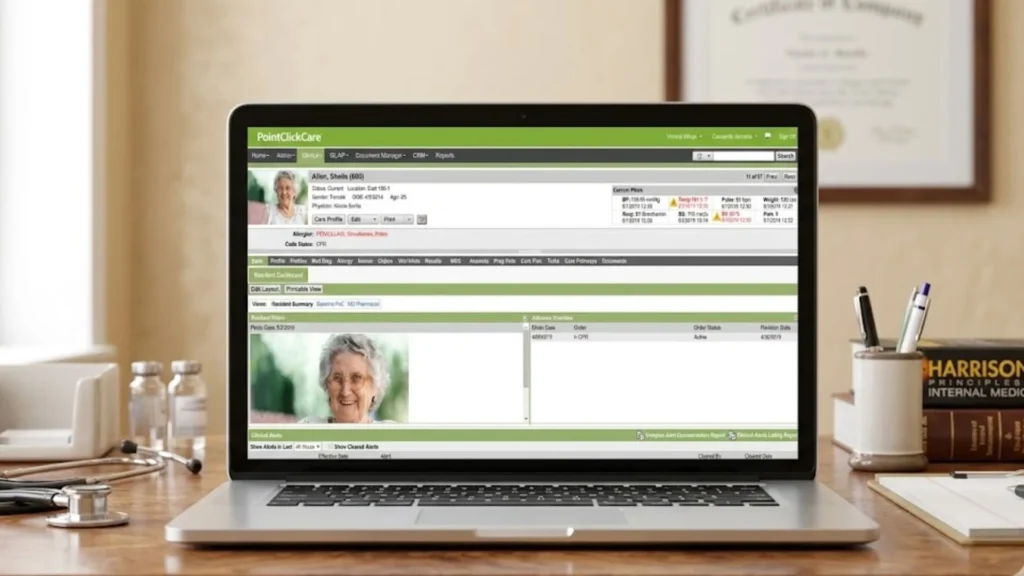
The PointClickCare login portal is the front door. Every user — nurses, administrators, therapists, even external physicians — gets their own credentials.
You don’t just waltz in. Security is tight. HIPAA compliance isn’t optional.
Here’s how it works for different roles:
- Nurses use the PointClickCare CNA login to chart vitals, record baths, and track meals.
- Doctors log in to review labs, sign orders, and write progress notes.
- Admins check dashboards for census counts, billing reports, and staff schedules.
The PointClickCare dashboard overview is clean. It shows you what needs attention. Red alerts for overdue meds. Yellow for upcoming tasks. Green for all good.
One facility manager told me her team went from 45 minutes of login fumbling to under two minutes with proper training.
That’s the power of a smooth healthcare data management platform.
But here’s the gritty truth. Logins can glitch. Passwords expire. And if you’re locked out at 2 AM with a resident in distress? Not fun.
Always keep the PointClickCare customer support number handy. Or better yet, set up two-factor authentication and never get locked out again.
PointClickCare EMR and EHR System: The Brain of the Operation
People mix up EMR and EHR. Let me clear it up.
An EMR is a digital version of a patient’s chart. An EHR is bigger — it shares data across different facilities.
The PointClickCare EHR system does both. It’s an electronic medical records system that also talks to hospitals, labs, and pharmacies.
In March 2026, PointClickCare launched a next-generation EHR specifically for practice groups. That’s a big deal.
Here’s what’s new:
- Ambient Scribe AI listens to doctor-patient conversations and writes notes automatically.
- AI-generated patient summaries pull key info from charts in seconds.
- Clinical risk insights flag potential problems before they blow up.
One doctor using the Ambient Scribe said he saves five minutes per note. With 25 patients a day, that’s over two hours back in his pocket.
The PointClickCare features and benefits don’t stop there.
This patient charting software includes medication management, MDS assessments for Medicare, billing automation, and regulatory compliance tools.
For a skilled nursing solution, it’s the gold standard. KLAS Research gave PointClickCare top scores in long-term care for the seventh straight year.
That’s not luck. That’s consistent execution.
Cloud Solution: Why Being Online Matters
Remember when software lived on one computer in the back office?
Those days are dead.
The PointClickCare cloud solution means everything lives on remote servers. You access it from anywhere with an internet connection.
Why does that matter for a nursing home?
Let me paint a picture. A resident falls at 3 AM. The night nurse charts the incident on a tablet. The morning shift sees it instantly. The doctor reviews it from home before coming in.
No waiting. No missed handoffs. No “I didn’t know.”
Cloud-based healthcare software also means automatic updates. You don’t install anything. New features just appear.
The downside? If the internet goes down, you’re in trouble. But PointClickCare has offline modes that sync when you’re back online.
One facility in rural Kansas lost power for six hours. Their staff kept charting on tablets. When the Wi-Fi came back, everything was uploaded. No data lost.
That’s reliability.
Nursing Home Software: Built for the Trenches
Let’s get specific about PointClickCare nursing home software.
This isn’t generic hospital software slapped onto senior care. It’s purpose-built.
Here’s what it handles daily:
- Admissions: Digital intake forms, insurance verification, and room assignment.
- Clinical documentation: Vitals, wounds, falls, behavior tracking.
- Medication administration: Barcode scanning to ensure the right resident gets the right pill.
- MDS assessments: Required for Medicare reimbursement. Automates the whole painful process.
- Billing: Submits claims to Medicare, Medicaid, and private insurers.
- Reporting: Tracks quality measures, census counts, and staff hours.
One director told me her facility reduced medication errors by 78% after switching to PointClickCare. That’s not a small win. That’s lives saved.
The PointClickCare charting system is particularly useful for CNAs. Instead of writing notes on paper, they tap buttons on a tablet.
“Bath given.” “Meal eaten 75%.” “Walked to bathroom with assistance.”
It takes seconds. And it’s all time-stamped and legally binding.
Patient Care Software: Where the Magic Happens
At the end of the day, software is just a tool.
What matters is that PointClickCare patient care software is improving actual human lives.
Here’s a real example. An 82-year-old with dementia stops eating. The CNA charts “refused breakfast” and “refused lunch.” The system flags a potential issue.
The nurse gets an alert. She checks on the resident. Call the doctor. Adjusts the medication.
Within 24 hours, the resident is eating again.
That’s the system working.
PointClickCare care coordination connects everyone on the team. Nurses talk to CNAs. Doctors talk to nurses. Pharmacies get e-prescriptions instantly.
No more phone tag. No more lost faxes.
The electronic health records system also shares data with hospitals. When a resident goes to the ER, the hospital can pull up their full history. Allergies, medications, recent falls — everything.
That means fewer redundant tests. Faster treatment. Better outcomes.
One study found that facilities using PointClickCare saw a 55% reduction in long-stay hospital readmissions. That’s massive for both patient health and facility finances.
The Mobile App: Charting from Your Pocket
You can’t carry a desktop computer down the hallway.
That’s why the PointClickCare mobile app exists.
The PointClickCare app download is available for both Android and iOS. The main app is called PointClickCare PE (Professional Edition).
Here’s what you can do from your phone:
- View patient medical history.
- Receive push notifications for pending orders.
- Provide e-signatures for telephone orders.
- Send HIPAA-compliant secure messages.
- Access patient charts for faster response times
For CNAs, there’s also the Care at Home Companion app. It’s designed for documenting home care services on the go.
One home health aide told me she used to carry a paper binder to every client visit. Now she just brings her phone. Tap, tap, tap. Done.
The mobile experience isn’t perfect. Some users complain about login issues after phone updates. But the company pushes regular security updates to keep things running.
Bottom line: The PointClickCare app turns your phone into a clinical tool. Use it wisely.
Integration Tools: Making Everything Talk
No software is an island.
PointClickCare integration tools connect the EHR system with hundreds of other platforms.
The PointClickCare Marketplace offers over 200 partner integrations. Think pharmacy systems, lab interfaces, billing software, and workforce management tools.
Here’s how it works. A pharmacy sends medication orders directly into PointClickCare. The nurse sees them instantly. No phone calls. No paper prescriptions.
Or consider workforce management. The system pulls census data automatically into scheduling software. Staffing adjusts based on actual resident counts.
One facility using Marketplace integrations reduced staff data entry by over 60%. That’s hours saved every week.
The technical side uses PointClickCare API connections for secure, real-time data exchange. Developers can build custom workflows. But for most facilities, the pre-built integrations are plenty.
Over 11,000 facilities currently use Marketplace solutions. And 62% use more than one.
Why? Because integration eliminates double work. And double work is the enemy of good patient care.
Training and Customer Support: Because You Will Have Questions
Let’s be honest. New software is scary.
PointClickCare knows this. That’s why they built PointClickCare training resources that actually help.
The training hub is called SmartZone — a 24/7 online learning system with over 450 eCourses.
Here’s what SmartZone offers:
- eCourses with simulations, videos, and interactive learning
- Virtual instructor-led sessions with live Q&A
- Role-based training plans for specific job titles
The numbers don’t lie. 93% of learners would recommend the training to a colleague. 97% of instructor-led training attendees would recommend it.
One training manager said SmartZone helped them “streamline our education process for new hires as well as refresher training for staff who have been using PCC for a while”.
For support, you’ve got options. Phone. Chat. Help desk. Knowledge base. Even 24/7 live support.
That said, some users report slow response times from customer support. It’s a common complaint with large software companies.
My advice? Use the knowledge base first. Then escalate if needed. And always keep your internal super-user trained to handle common issues.
PointClickCare Pricing: What Does It Actually Cost?
Here’s where things get fuzzy.
PointClickCare doesn’t publish prices publicly. You have to request a custom quote.
But industry data gives us a ballpark.
For small facilities with 1-10 users, monthly costs start around $500 to $1,000. Implementation and setup can add another $5,000 to $20,000.
Medium facilities with 50-200 patients daily might pay $2,000 to $5,000 per month with setup fees of $25,000 to $75,000.
Large organizations with 200+ patients can see monthly fees of $5,000 to $15,000+ and implementation costs up to $200,000.
PointClickCare pricing varies based on modules, number of users, and facility size. You’re not buying a box. You’re buying a custom solution.
Some review sites suggest pricing starts as low as $100 to $500. But that’s likely for very basic, limited setups.
The takeaway? Budget for a significant investment. This isn’t cheap software. But for facilities handling hundreds of residents, the ROI comes from fewer errors, faster billing, and better compliance.
The Bottom Line: Should You Use PointClickCare?
Here’s my honest take.
If you run a skilled nursing facility, senior living community, or home health agency, PointClickCare is probably the right choice. It’s the market leader for a reason.
The healthcare workflow automation saves time. The clinical documentation system reduces errors. The cloud solution enables real-time collaboration.
But it’s not perfect.
Implementation can be painful. Training takes time. And the cost is significant for smaller facilities.
One user review summed it up: “The setup and implementation can be complex and time-consuming; however, once complete, things run smoothly”.
That’s the trade-off. Hard work upfront. Smooth sailing after.
For large facilities with 100+ beds, PointClickCare is the industry standard. For tiny operations with tight budgets, consider alternatives like MatrixCare or American HealthTech.
But if you want the software that runs 60% of American skilled nursing homes? This is it.
Q1: How do I access the PointClickCare login portal?
Go to your facility’s unique PointClickCare URL. Enter your username and password. Most facilities use single sign-on through their internal network. If you forget your password, click “Forgot Password” or contact your facility’s IT administrator.
Q2: Is there a free version of PointClickCare?
No. PointClickCare is a paid, subscription-based platform. Pricing starts around $500 per month for small facilities and scales up based on users, modules, and facility size. You can request a free demo to see the software in action before committing.
Q3: Can I use PointClickCare on my phone?
Yes. Download the PointClickCare PE app from Google Play or the Apple App Store. It lets you view patient charts, sign orders, and send secure messages. CNAs can also use the Care at Home Companion app for documenting home care services.
Q4: How long does PointClickCare training take?
Training varies by role. CNAs might complete basics in a few hours. Nurses and administrators typically need 10-20 hours of training across multiple modules. SmartZone offers self-paced eCourses and live virtual sessions. Most facilities schedule training over 2-4 weeks during implementation.
Q5: What happens if the internet goes down?
PointClickCare has offline capabilities. Staff can continue charting on tablets or laptops. When the internet connection returns, all data syncs automatically to the cloud. No information is lost. However, real-time features like messaging and alerts won’t work until the connection is restored.
Final Thoughts
PointClickCare isn’t glamorous. It’s not going to win design awards.
But it works.
For the nurses charting at 2 AM, it’s a lifeline. For the doctors reviewing labs from home, it’s a time-saver. For the families wondering how Mom is doing, it’s peace of mind.
The cloud-based healthcare software market is growing fast. With 95 million Americans expected to be 65+ by 2060, tools like PointClickCare will only become more critical.
If you’re in the senior care space, you need a solid EHR system. PointClickCare is the safe bet. The proven choice. The software that doesn’t make you cry.
Now go log in and take care of your residents. That’s what really matters.
Disclaimer: This article is for informational purposes only. Pricing and features mentioned are based on publicly available data and may vary. Always consult PointClickCare directly for current pricing and implementation details specific to your facility.
Read More: Monkey App