
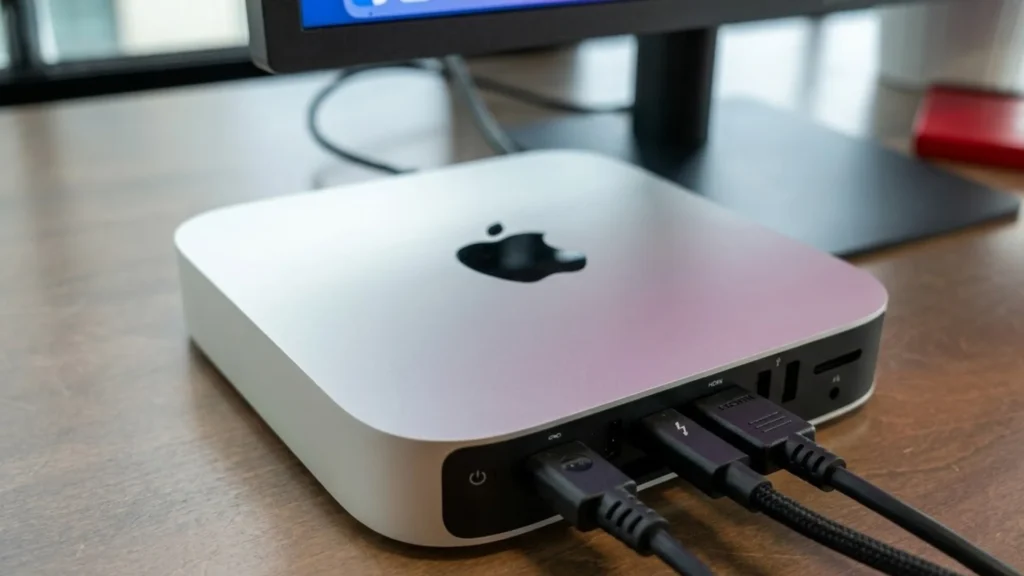

Here is the thing about the Mac Mini that nobody tells you.
It hides.
You will unpack it. You will set it on your desk. And then you will literally forget it exists.
That is the magic of the Apple Mac Mini. It is smaller than a sandwich. It makes no noise. It does not blink at you with stupid lights. It just sits there, plotting, waiting, ready to explode into action the second you ask it to do something.
I have owned three of them over the years. The first one lived under a pile of papers for six months. I only remembered it existed when I moved apartments.
And that is exactly how Apple wants it.
Apple Mac Mini technical specifications M4 / M4 Pro
📦 2024–2026 lineup • 5×5 inch footprint • carbon neutral (M4 models)
| 📡 Processor & memory | |
|---|---|
| Chip |
M4 10‑core CPU (4 performance + 6 efficiency), 10‑core GPU, 16‑core Neural Engine, hardware‑accelerated ray tracing M4 Pro 12‑core CPU (8 performance + 4 efficiency), 16‑core GPU, 16‑core Neural Engine, hardware‑accelerated ray tracing, 273GB/s memory bandwidth |
| Memory (RAM) & bandwidth |
M4: 16GB unified memory (configurable up to 32GB) · 120GB/s bandwidth M4 Pro: 24GB unified memory (configurable up to 64GB) · 273GB/s bandwidth |
| Storage (SSD) |
M4: 256GB / 512GB / 1TB / 2TB | M4 Pro: 512GB / 1TB / 2TB / 4TB / 8TB All SSDs are soldered; external Thunderbolt expansion recommended for additional capacity. |
| 🔌 Ports & expansion | |
| Front I/O (all models) | 2 × USB‑C (up to 10 Gbps) 3.5 mm headphone jack advanced support for high‑impedance headphones |
| Rear I/O |
M4: 3 × Thunderbolt 4 (USB‑C, up to 40 Gbps) HDMI 2.0 Gigabit Ethernet (10GbE optional) M4 Pro: 3 × Thunderbolt 5 (up to 120 Gbps) HDMI 2.1 10Gb Ethernet configurable ⚡ All rear Thunderbolt ports support charging and DisplayPort. |
| Networking / wireless |
Wi‑Fi 6E (802.11ax) Bluetooth 5.3 Gigabit Ethernet standard (10Gb upgrade on both M4 and M4 Pro via build‑to‑order) |
| 🖥️ Display support | |
| Simultaneous displays (M4) |
Up to 2 displays: • 2 × 6K (60Hz) over Thunderbolt + 1 × 4K (60Hz) over HDMI • or 1 × 8K (60Hz) over HDMI + 1 × 5K over Thunderbolt |
| Simultaneous displays (M4 Pro) |
Up to 3 displays: • 3 × 6K (60Hz) over Thunderbolt • or 2 × 6K + 1 × 4K (HDMI) • supports 8K via HDMI 2.1 on Pro models |
| ⚖️ Dimensions & power | |
| Size & weight |
12.7 cm × 12.7 cm × 5.0 cm (5.0 × 5.0 × 1.97 inches) Weight: 0.67 kg (1.48 lb) – identical for M4 and M4 Pro |
| Power supply & efficiency |
Built‑in 155W power supply (internal, no external brick) Input: 100–240V AC, 50–60Hz M4 typical usage: 6W idle – 65W load | M4 Pro: 8W idle – 110W load Carbon neutral (M4 models) – recycled materials + renewable energy |
| 🔋 Environmental & other | |
| In the box |
Mac mini, power cord (braided, 1.8m), documentation. (No keyboard, mouse or monitor included.) |
| Operating system / features | macOS Sequoia (or later) · Apple Intelligence ready · FileVault encryption · Find My · T2 equivalent integrated in Secure Enclave. |
What Even Is This Thing?
The Mac Mini is Apple’s cheapest computer. It is also the most honest one.
No screen attached. No keyboard included. No mouse in the box. Just a silver square that contains the exact same brain power as computers, costing twice as much.
You bring your own stuff. That is the deal.
The Mac Mini M2 version starts around $599 if you catch it right. The Mac Mini M2 Pro jumps up closer to $1,299. And the brand new Mac Mini 2026 models with the M4 chip? They start at $599 and go up faster than a squirrel on caffeine, depending on what you choose .
Here is what shocked me the first time I opened one.
It weighs next to nothing. Like, did they forget to put the computer inside? You pick up the box and think someone stole the contents.
They did not. It is just that modern Mac Mini specs are packed into a space smaller than most novels.
The 2026 Models: What Changed?
Apple redesigned the Mac Mini 2026 lineup recently. This was the first real design change since 2010 .
The new one is smaller. Like, actually smaller. We are talking 12.7 centimeters across. That is roughly the size of your hand if you have normal human hands .
The front now has ports. This matters more than you think.
Older models made you reach around the back every single time you needed to plug in a stupid USB stick. You had to feel around like you were in a dark cave searching for treasure.
Now? Two USB-C ports right there on the front. Plus a headphone jack that actually works with high-impedance headphones if you are one of those people who notice audio quality .
The power button moved to the bottom.
Yes. The bottom.
People lost their minds about this online. They screamed. They typed angry comments. They made jokes about Apple losing its soul.
Here is the truth: you will press that button maybe twice in the entire time you own the computer. Who cares where it is? The thing sleeps so efficiently that shutting it down is basically pointless .
Raw Power in a Tiny Box
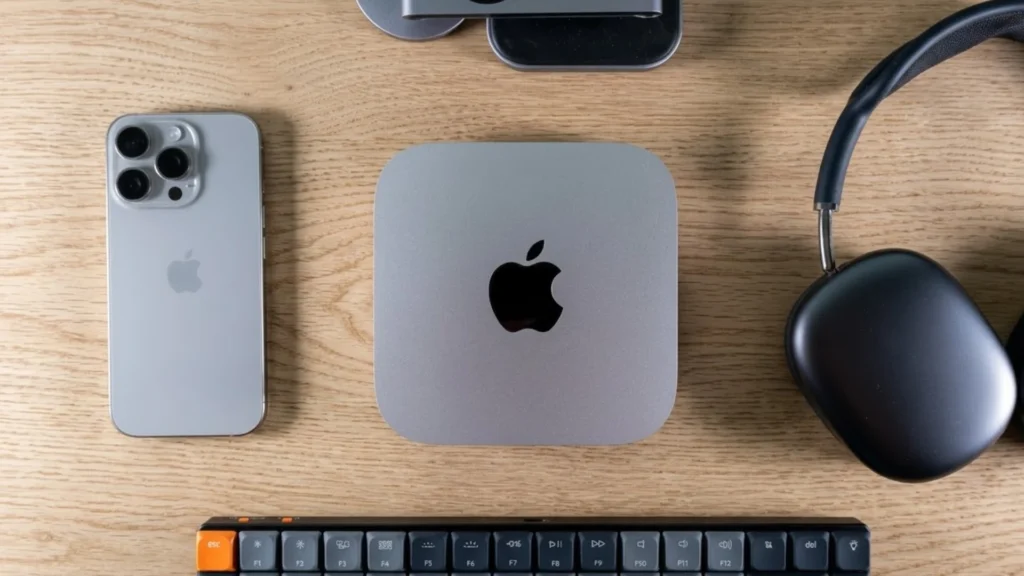
Let me tell you about the Mac Mini M4 and M4 Pro because this is where things get stupidly impressive.
The base Mac Mini M4 comes with a 10-core CPU and 10-core GPU. That means four performance cores and six efficiency cores working together like a well-organized heist team .
It scored around 3,850 on single-core Geekbench tests. About 14,800 on multi-core. And 57,500 on GPU tests .
Translate that from nerd numbers to real life.
It means you can have 47 browser tabs open, Spotify playing, Photoshop rendering something, and a Zoom call running, and the fan still will not turn on.
Because there is barely any noise. At all. Ever.
The Mac Mini M4 Pro takes things further. Twelve CPU cores. Eight of them are performance-focused. Sixteen GPU cores. Memory bandwidth hitting 273 GB per second .
That number matters if you edit a video. It means you can scrub through 8K footage like it is standard definition.
Mac Mini vs MacBook: The Fight
Here is the question people actually ask: Mac Mini vs MacBook — which one wins?
Depends entirely on where you sit when you work.
If your laptop lives on a desk 90 percent of the time and stays plugged into an external monitor, the Mac Mini makes more sense. You stop paying for a screen, battery, and keyboard that you barely use .
Batteries wear out. It is physics. Leave a MacBook plugged in constantly, and you are managing battery health instead of forgetting about it. The Mac Mini removes that entire category of stress .
If you move around? Different story.
Couch workers. Coffee shop people. “I need to work from the backyard today,” types. You want the laptop.
But here is a combo I love: Mac Mini for home base, iPad for everything else. Use the iPad for notes in class or meetings. Come home, plug nothing, and everything syncs instantly through iCloud .
Total cost for both? About the same as one MacBook Air. Sometimes less .
Setting It Up Without Screaming
The Mac Mini setup guide is simple, but there are traps.
First problem: you need a monitor, keyboard, and mouse. If you are coming from a laptop, you might not own these. Factor that into your budget .
Apple charges over $200 for their keyboard and mouse together. That hurts. But you can use literally any USB or Bluetooth accessories. Old Dell keyboard from 2012? Works fine. Random Logitech mouse? Plug and play .
When you first power on, Setup Assistant walks you through everything.
Language. Wi-Fi. Location services. The usual stuff .
If you have another Mac or an iPhone nearby, it does this cool thing where it pulls your settings automatically. You barely do anything. It just works .
The one setting you should actually care about: FileVault. Turn it on. It encrypts your drive so if someone steals your Mac Mini (unlikely, given its size, but possible), they cannot access your files .
Also, enable Find My Mac. Because again, tiny computer, easy to lose behind a desk, nice to know you can ping it .
Who Actually Buys This Thing?
Students love the Mac Mini. Here is why.
Dorm rooms have zero space. The Mac Mini fits anywhere. Under the monitor. Behind the monitor. Taped to the wall if you are feeling adventurous .
It leaves room for snacks. Priorities.
Plus, you can upgrade the monitor later without replacing the whole computer. Your $600 Mac Mini from freshman year can drive a fancy 5K monitor senior year with zero issues .
Video editors also love it. The Mac Mini for video editing performance is legit. The media engine handles ProRes like it is nothing. Multiple streams of 8K? Fine. Go crazy .
The Mac Mini for gaming conversation is more complicated.
Mac gaming is getting better, but still not at a Windows level. The M4 Pro includes hardware ray tracing now. That is new. That matters. But the library of games is smaller .
If gaming is your main thing, maybe look elsewhere. If gaming is your Tuesday night thing, the Mac Mini handles indie games and older titles perfectly fine.
Ports and Connectivity: What Actually Hooks Up
The Mac Mini ports and connectivity situation are better than any MacBook.
Base M4 model gives you:
- Three Thunderbolt 4 ports on the back
- Two USB-C ports on the front
- HDMI (supports 8K)
- Ethernet (you can upgrade to 10 gig if you are fancy)
- Headphone jack that drives high-impedance headphones
The M4 Pro version upgrades the Thunderbolt ports to version 5. Double the speed. 120 Gbps transfer rates. This matters if you work with massive files or run multiple high-resolution displays .
You can connect up to three external monitors to the M4 Pro. Two at 6K over Thunderbolt, one at 4K over HDMI. Or one 8K display if that is your thing .
Wi-Fi 6E is standard. Bluetooth 5.3. All the modern stuff works .
Memory and Storage: Choose Wisely
Here is the painful part.
You cannot upgrade anything later.
The RAM is part of the chip now. The storage is soldered to the board. What you buy is what you keep forever .
This means you have to guess your future needs.
For Mac Mini RAM upgrade conversations: buy more than you think you need. The base models start at 16GB now, which is good. But if you do creative work, consider 24GB or 32GB. If you are a developer running virtual machines, go to 48GB or 64GB on the Pro models .
Mac Mini storage options range from 256GB to 8TB, depending on model and how much money you want to spend.
Here is the hack: buy the base storage and use external SSDs. Thunderbolt 4 and 5 are so fast that external drives feel internal. You save hundreds of dollars. You lose zero performance .
Mac Mini Price Reality Check
Let us talk actual dollars.
The Mac Mini price starts at $599 for the base M4 model. That gets you 16GB RAM and 256GB storage .
The Mac Mini M2 models still exist in the refurbished market for less. Apple refurbished units are basically new. Different box, same warranty, lower price .
The Mac Mini M2 Pro refurbished runs around $1,099, depending on configuration .
The fully loaded M4 Pro with max RAM and 8TB storage? Over $4,000. Which is insane, but also exists for people who absolutely need it .
Here is the value proposition: a similarly specced MacBook Pro costs about $1,000 more for the same internal components. You pay for the screen, battery, and portability.
If you do not need those things, the Mac Mini saves you real money.
The M5 Mac Mini: Looking Ahead
The Mac Mini M5 is coming. Probably early to mid 2026 .
Rumors point to a March 4, 2026 announcement event. The M5 chip will use an enhanced 3-nanometer process. Expect 10 to 20 percent faster CPU performance than M4. Better GPU. Improved Neural Engine for AI tasks .
The M5 Pro version will likely get the Thunderbolt 5 standard. More GPU cores. Higher memory bandwidth .
If you are on an M1 Mac Mini or an older Intel model, the M5 will feel like moving from a bicycle to a rocket ship.
If you just bought an M4? The M5 will be nice but not life-changing. Skip this generation.
The Bottom Line
The Mac Mini is not flashy.
It does not scream for attention. It does not have a glowing logo. It does not make entrance music when you open the lid.
It just works. Every single day. Quietly. Reliably. Faster than computers ten times its size.
You bring your own screen. You bring your own keyboard. You bring your own mouse.
What you get in return is the best value in Apple’s entire lineup. A computer that will outlast your patience before it outlasts its usefulness.
The Mac Mini M2, M4, or upcoming M5 — pick your generation based on your budget and needs. But pick one. You will forget it is there.
Until you need it.
And it will be ready.
Frequently Asked Questions
Is the Mac Mini good for video editing?
Yes, absolutely. The M4 and M4 Pro chips include dedicated media engines that handle ProRes, H.264, and HEVC video formats with ease. You can edit multiple streams of 8K video without breaking a sweat . The M4 Pro, with its higher memory bandwidth, is especially good for this.
Can I upgrade the RAM later?
No. The RAM is unified memory built into the M-series chips. You cannot upgrade it after purchase. Choose your configuration carefully at the time of buying .
What comes in the box?
Just the Mac Mini and a power cable. No keyboard, no mouse, no monitor. You provide your own peripherals .
Is the Mac Mini good for students?
Yes, especially when paired with an iPad. Use the Mac Mini in your dorm for heavy work and the iPad for taking notes in class. The combination often costs less than a MacBook and gives you more flexibility .
When will the M5 Mac Mini release?
Expected in early to mid 2026, possibly announced at Apple’s March event. The M5 chip will bring faster performance and better AI capabilities .
Prices and specifications accurate as of March 2026. Always check Apple’s official website for current configurations.
Read More: Common App