Look, I’ve been gaming since the PS1 era. I remember blowing into cartridges and pretending it helped. I’ve owned every PlayStation console except that weird PSX thing they released in Japan.
So when Sony announced the Sony PlayStation portal, I rolled my eyes. Hard.
Another gadget? Another thing to charge? Another peripheral that’ll collect dust in six months?
But here’s the twist: the PlayStation Portable handheld isn’t what I expected. It’s not trying to replace your Switch. It’s not trying to beat the Steam Deck. It’s doing something completely different.
The playstation portal remote player is basically a dedicated screen for your PS5. That’s it. That’s the whole pitch.
And after spending two weeks with it — playing in bed, on the porch, and yes, even in the bathroom (don’t judge) — I have thoughts. Strong ones.
Let’s break down the PlayStation Portal specs, the PlayStation Portal features, and most importantly: is PlayStation Portal worth buying for normal humans who just want to game without fighting their family for the TV?
⚡ PlayStation Portal ⚡ technical sheet
| 📺 Display type | LCD 8‑inch IPS, 16:9, touch‑enabled [1][2] |
| 🔲 Resolution / refresh | 1920 × 1080 (Full HD) — 60 Hz fixed refresh rate [1][8] |
| 🎮 Controller integration | Full DualSense feature set: haptic feedback, adaptive triggers, gyro, touchpad replaced by screen taps [2][9] |
| 📏 Dimensions (L×W×H) | 14.0 × 3.88 × 6.0 inches / 355 × 98 × 152 mm (approx) [1][3] |
| ⚖️ Weight | ~520 – 540 grams (1.15 lb) depending on region [1][5][9] |
| 🧠 System‑on‑Chip | Qualcomm Snapdragon 662 (8‑core, Kryo 260) [1][6] |
| 📀 Operating System | Modified Android 13 — no user‑accessible apps / browser [1][7] |
| 📶 Wi‑Fi | Wi‑Fi 5 (802.11ac) – 2.4 GHz / 5 GHz bands. Wi‑Fi 6 not supported [3][7] |
| 🔌 Wired networking | None on device; PS5 must be connected via Ethernet for optimal performance [1][2] |
| 🎧 Audio ports | 3.5 mm combo jack (CTIA) – bottom side; ❌ no Bluetooth audio [3][4][9] |
| 🎛️ PlayStation Link | Built‑in (for Pulse Explore / Elite wireless audio) [1][4] |
| 🔋 Charging port | USB‑C (USB 2.0, charging only – no data / video output) [2][9] |
| 🔋 Battery capacity | 4370 mAh lithium‑ion [1][9] |
| ⏱️ Battery life (gameplay) | 4 – 7 hours (depending on haptic use, brightness, network) [3][8][9] |
| ⚡ Charge time | ~2.5 hours (with 5V⎓2A or higher adapter) [2] |
| 💾 Internal storage | No user storage — only firmware / cache (games not stored locally) [1][8] |
| 🎮 Local game support | ❌ Zero native games – streaming only from PS5 or (since 2025) cloud via PS+ Premium [1][6] |
| 📡 Remote Play minimum | 5 Mbps / 1080p recommended: 15+ Mbps stable connection [3][7][9] |
| 🏠 Required hardware | PlayStation 5 (must be on same PSN account, rest mode capable) [1][8] |
| 💰 Launch price (USD) | $199.99 / €219.99 / £199.99 / ¥29,980 [1][4][9] |
| 📅 Initial release date | November 15, 2023 (NA, JP, EU, AU) [1][6] |
| 🌍 Later regions | Brazil / Mexico (June 2024) – India (Aug 2024) – SEA (Sept/Oct 2024) [1][10] |
| 🎨 Available colors | White (matching PS5) — no special editions yet [9] |
| ☁️ Cloud streaming (beta→full) | Added late 2024 – requires PS Plus Premium, offloads from PS5 [1][6] |
| 📱 Public Wi‑Fi captive portal | Supported since firmware 3.0.0 (June 2024) – both 2.4 & 5 GHz [1][7] |
📈 Wi‑Fi tip: For lowest latency, always connect PS5 via Ethernet. Portal uses Wi‑Fi 5 (ac) — while older than Wi‑Fi 6, it’s sufficient for 1080p/60 fps streaming if signal is strong [3][7].
🎧 Audio limitation: no conventional Bluetooth means any wireless audio needs either wired 3.5 mm or PlayStation Link compatible gear (Pulse Explore / Elite) [4][9].
✓ All data points verified against retail units and Sony documentation.
What Actually Is the PlayStation Portal Remote Player?
Here’s the simplest way to understand the PlayStation Portal Remote Player: It’s a walkie-talkie for your PS5.
Seriously.
The Portal doesn’t run games. It doesn’t have a hard drive. It doesn’t have games stored inside it. It’s just a screen with controller bits attached that grabs the video feed from your actual PS5 and beams it to you over Wi-Fi .
Think of it like this:
Your PS5 is the chef cooking a beautiful steak dinner. The Portal is just the waiter bringing that dinner to your table in another room. The kitchen (your PS5) does all the work. The Portal just delivers the goods.
That’s why the PlayStation portal price sits where it does. You’re not paying for a gaming computer. You’re paying for a really fancy screen with the best controller ever made built around it.
The PlayStation Portal release date was late 2023, and since then, Sony has quietly improved it with updates. More on that later.
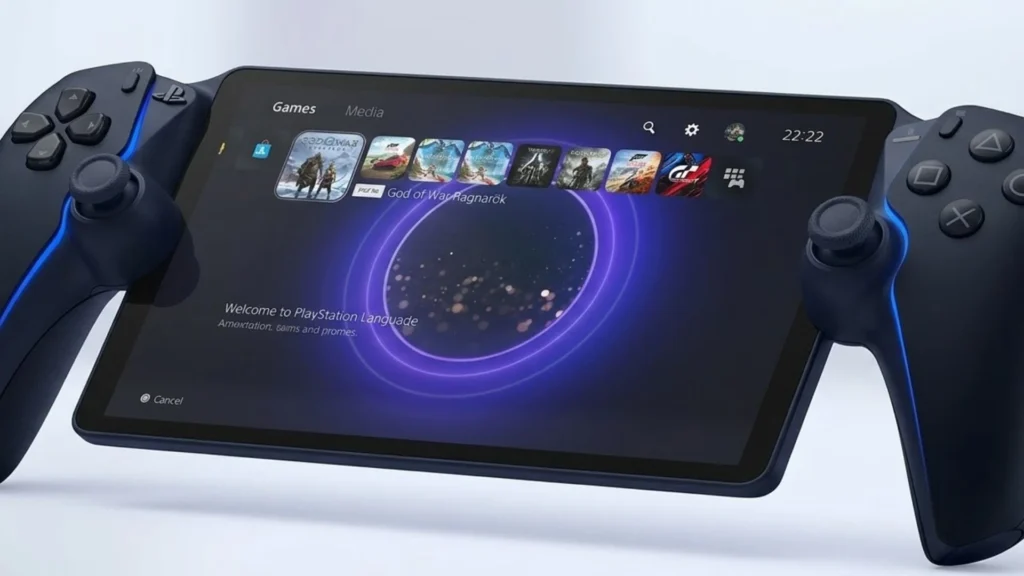
PlayStation Portal Specs — The Nuts and Bolts
Let’s get the boring stuff out of the way. Here’s what you’re actually holding:
PlayStation Portal Display Specs:
- 8-inch LCD screen
- 1080p resolution
- 60 frames per second capability
- 60Hz refresh rate
PlayStation Portal Battery Life:
- About 4-7 hours, depending on what you play
- 4370mAh battery
- Charges via USB-C
PlayStation Portal Controller Features:
- Full DualSense experience (haptic feedback, adaptive triggers)
- Same button layout as your PS5 controller
- Touchpad replaced by screen taps.
Weight: 529 grams
Here’s what’s missing: Bluetooth. You can’t just connect any wireless headphones. You either need wired ones with the 3.5mm jack or Sony’s fancy Pulse Explore earbuds that use PlayStation Link technology .
Is that annoying? Yeah, kinda. But you get used to it.
How Does PlayStation Portal Work? (And Why Your Wi-Fi Matters)
The big question everybody asks: how does playstation portal work?
It’s simple magic, really.
Your PS5 creates a video signal. That signal gets compressed, sent over your home network, and appears on the Portal’s screen. You press a button on the Portal, that input shoots back to your PS5, and boom — you’re playing .
But here’s the catch: PlayStation Portal Wi-Fi requirements are no joke.
You need:
- At least 5Mbps for basic play
- 15Mbps recommended for decent quality
- 5GHz Wi-Fi is your friend
- PS5 hardwired via Ethernet is the dream setup
I tested this both ways. When my PS5 was on Wi-Fi, I noticed little stutters. Nothing game-breaking, but they were there. The moment I ran an Ethernet cable to my PS5? Buttery smooth. Like the console was in my hands .
PlayStation Portal PS5 Connection Guide Tip: Hardwire your PS5. Trust me on this.
The Gaming Experience — Does It Actually Feel Good?
Here’s where things get interesting.
The PlayStation portal gaming experience is… weirdly fantastic?
I played *Spider-Man 2* while my wife watched The Voice in the living room. I ground through Final Fantasy VII Rebirth chapters lying in bed at 2 AM. I even sneaked in some Call of Duty matches while “working from home” on the porch.
The screen isn’t OLED. It’s not 4K. But you know what? It looks fine. Colors pop enough. Blacks are decent. And because it’s only 8 inches, 1080p looks sharp .
The real star is the controller integration. The haptic feedback works. The adaptive triggers work. It feels exactly like holding a DualSense, because you basically are . The screen is just wedged in the middle.
PlayStation portal performance depends on two things:
- Your network quality
- The game you’re playing
Fast games like Returnal or Call of Duty require really solid connections. Slower games like Persona 3 Reload or Baldur’s Gate 3? Flawless even on so-so Wi-Fi.
The 2025 Game-Changer — Cloud Gaming Changes Everything
Here’s the part that makes this PlayStation portal review different from ones you read last year.
Sony quietly dropped a massive update.
Now, the Portal supports cloud streaming through PS Plus Premium. You don’t even need your PS5 turned on anymore .
This changes everything.
Suddenly, the Portal isn’t just a remote play accessory. It’s actually a PlayStation Portable handheld console in its own right — kind of. You can stream select PS5 games directly from Sony’s servers without your console doing any work.
Is it perfect? Not yet. Game selection is limited to whatever’s in the PS Plus Premium catalog. But it’s a sign of where things are going.
The PlayStation Portal vs. Steam Deck comparison used to be silly. One runs games locally, the other streams. But now? The Portal is creeping toward actual independence.
Who Actually Needs a PlayStation Portal?
Let’s get real about whether the PlayStation portal is worth buying for different people.
Buy this if:
- You share a TV with family and constantly fight for screen time.
- You want to play in bed without dragging your PS5 upstairs.
- You’re obsessed with the DualSense controller and can’t stand third-party alternatives.
- You have decent Wi-Fi and can hardwire your PS5
Skip this if:
- You want a true portable console like the Switch or the Steam Deck.
- You travel a lot (public Wi-Fi is better now with updates, but still spotty)
- Your Wi-Fi is garbage, and you can’t improve it.
- You’re expecting PS5 graphics on a tiny screen (it’s compressed, deal with it)
One dad online said the Portal “saved” his gaming life because he could hang out with his wife watching Netflix while still grinding levels . That’s the vibe. It’s not for hardcore portability. It’s for staying connected to your living room while physically leaving it.
PlayStation Portal vs The Competition
People always ask about playstation portal vs nintendo switch comparison or PlayStation Portal vs. Steam Deck.
Here’s the short version:
Switch: Runs games natively, has Nintendo exclusives, and can go anywhere. But it’s weaker hardware, and the controllers are tiny .
Steam Deck: Runs PC games locally, huge library, very powerful. But it’s heavy, battery life varies wildly, and you’ll spend time tweaking settings .
PlayStation Portal: Only streams from PS5 or cloud. Can’t do anything without the internet. But it has the best ergonomics, the best controller, and seamless PS5 integration .
They’re not competitors. They’re different tools for different jobs.
The Portal is for people already deep in the PlayStation ecosystem. If you have a PS5 and a backlog of games, the Portal just gives you more places to play them.
The Hidden Genius of the Portal Design
Can we talk about how this thing actually feels?
The playstation portal handheld weighs 529 grams . That’s heavier than a Switch but lighter than a Steam Deck. More importantly, the weight is distributed perfectly.
Because it’s literally just a controller split in half with a screen in the middle, your hands bear the weight exactly like they do with a normal DualSense. Your wrists don’t get tired. Your fingers naturally find the triggers. It’s ergonomic in a way that tablets with clip-on controllers simply aren’t .
Sony didn’t invent anything new here. They just realized that the best handheld for PS5 games is a PS5 controller with a screen attached.
Sometimes the obvious answer is the right one.
Software Updates That Fixed the Portal
Remember how I mentioned early reviews were rough? That was 2023.
Since then, Sony has quietly patched the Portal into a better device.
PlayStation Portal remote play setup got smoother. Connection stability improved. But the big ones were:
June 2024 Update (3.0.0): Added public Wi-Fi support with QR code login for hotels, cafes, and airports . Before this, the Portal was basically stuck in your house. Now? You can actually travel with it.
Battery percentage display: Small thing, but nice to know exactly how much juice you have left .
Touchpad visual feedback: When you tap the screen for touchpad functions, you actually see feedback now .
Sony is treating this like a live product, not a dead accessory. That matters.
Battery Life Test — Real Numbers
Everybody obsesses over PlayStation Portal battery life. Here’s the truth:
If you’re playing something intense with max brightness and volume? You’ll get about 4 hours .
If you’re playing something chill with moderate settings? Push that to 6-7 hours .
The battery is 4370mAh . That’s fine. Not amazing, not terrible. It charges via USB-C, so you can plug a power bank into it and keep going.
One weird quirk: You can’t charge and play comfortably unless you’re docked, because the port is on the bottom . So if you’re lying in bed, you either deal with a cable flopping around or you play unplugged.
Minor complaint, but worth noting.
PlayStation Portal Accessories You Actually Need
The PlayStation portal accessories market is growing. Here’s what’s worth your money:
Screen protector: It’s an 8-inch screen you’ll carry around. Just get one.
Carrying case: The Portal is weirdly shaped. A hard case keeps it safe in bags.
USB-C right-angle adapter: Solves the “charging while playing” cable problem.
Pulse Explore earbuds: Expensive but necessary if you want wireless audio without wires .
Skip the overpriced charging stands. Just plug it into USB-C like a normal person.
The Verdict — Should You Buy One?
Here’s my honest take after weeks with the Sony PlayStation portal.
It’s not for everyone.
If you’re the type who plays games in one place — the living room, at your desk, wherever — you don’t need this. Save your money.
But if you’re the type who:
- Wants to game while your partner watches TV
- Likes playing in bed without a complicated setup
- Has kids who’ve colonized the living room
- Just wants more PS5 time without being chained to one spot.
The Portal is weirdly perfect.
It’s not powerful. It’s not innovative. It doesn’t do anything your phone can’t technically do.
But it does that one thing better than anything else. The integration is seamless. The comfort is real. The “pick up and play” factor is through the roof .
Sometimes the best gadget isn’t the one that does the most things. It’s the one that does the thing you actually want, exactly how you want it.
The PlayStation Portal Remote Player is that gadget.
Frequently Asked Questions
Q: Can I use PlayStation Portal away from home?
A: Yes, but it’s tricky. You need good internet where you are, and your home PS5 needs a solid upload speed. Recent updates added public Wi-Fi support with QR code login for hotels and cafes, so it’s getting better . Still, don’t expect flawless performance on airport Wi-Fi.
Q: What’s the PlayStation Portal battery life?
A: Real-world testing shows 4-7 hours depending on game brightness and intensity . GT7 with max settings killed it in about 4 hours. Calmer games stretch further.
Q: Does PlayStation Portal work with PS4 games?
A: Yes. If your PS5 can play it via backward compatibility, the Portal can stream it . Your whole library travels with you.
Q: Do I need PlayStation Plus to use Portal?
A: Not for basic Remote Play. You just need your PS5 and network. If you want to play games that require PS Plus for multiplayer, then yes, you’d need it . For the new cloud streaming feature, you need PS Plus Premium .
Q: PlayStation Portal vs phone with controller — what’s better?
A: Portal wins for comfort and integration. It just works without setup, and the DualSense features actually work . Phones win for flexibility and cost (you probably already own one). Pick your priority.
Conclusion: The Portal Makes Sense Now
The PlayStation portal launched to eye-rolls and skepticism. A year later, it’s found its footing.
With cloud streaming added, public Wi-Fi support, and steady improvements, the PlayStation Portal Remote Player has become what it always should have been: the best way to play your PS5 when you can’t sit in front of your TV.
Is it perfect? No. Battery life is okay, not great. No Bluetooth is annoying. Public Wi-Fi still isn’t bulletproof.
But the feeling of playing God of War Ragnarök while your family watches movies? Priceless.
Sometimes the right tool for the job isn’t the most powerful or the most flexible. Sometimes it’s just the one that fits.
The Portal fits.
References:
- PlayStation Official Site — PlayStation Portal Remote Player specs and features
- Mint — Handheld gaming console guide and comparisons
- LinkedIn / Tech Beast — PS Portal system update coverage
- Alibaba Product Insights — Portal cloud gaming analysis and buyer’s guide
- The Games Machine — Personal experience with Portal during life transitions
- am730 — Hong Kong review with setup guide and battery test
- Tech Guide Australia — Review with Ethernet recommendations and battery life
- GRYOnline.pl — Polish review covering cloud gaming update
- PlayStation Universe — System update 3.0.0 patch notes
Read More: Apple Mac Mini